
You find Amazon Lightning Deals on the Today's Deals page, in the Amazon app, and in the Upcoming tab that shows deals before they start. The hard part is not finding them. It is getting to the right one while stock remains, then confirming the discount is real. This guide covers where to look, how to get alerts, how to claim a deal, and how to judge the price.
TL;DR
- Open Today's Deals on desktop or the Amazon app and filter to Lightning Deals. The Upcoming tab shows deals up to 24 hours ahead, with start times.
- Tap "Watch this Deal" for a phone alert, or join the waitlist if a deal is already claimed out.
- Once a deal is in your cart you have 15 minutes to check out. Use Proceed to Checkout, not 1-Click.
- Amazon publishes no forward schedule for Lightning Deals outside big events, so alerts beat guessing.
- Compare the deal price with the item's price history before you buy. A big percent-off badge proves little.
Table of Contents
- What Lightning Deals are and who can claim them
- Where to find Lightning Deals on Amazon
- Is there a Lightning Deals schedule?
- Get alerts instead of refreshing the page
- How to claim a deal before it sells out
- Finding Lightning Deals during major sales events
- Is the Lightning Deal actually a good price?
- Our perspective
- Track the items you want with BasketPrice
- Mistakes that cost people Lightning Deals
- FAQ
- Sources
What Lightning Deals are and who can claim them
Lightning Deals are time-limited promotions with limited stock. Amazon's help page says they are available one per customer until the offer ends or all deals are claimed. That one-per-customer rule matters: you cannot stock up on a bargain.
Two limits end every deal. One is the timer. The other is the stock: when 100% of the units are claimed, the deal is over even if time remains. Business Insider describes the timer as usually 2 to 6 hours, though some sources report longer runs for sellers during major events, so treat the clock on the deal page as the only authority.
During Prime Day or Prime Big Deal Days, Lightning Deals are exclusive to Prime members. Outside those events, the rules on the specific deal page apply, so read the badge on each one.
Where to find Lightning Deals on Amazon
On the website
Go to the Today's Deals page and scroll the horizontal row of shortcuts until you see Lightning Deals. Amazon's own shopping guide describes this route. Click it and you get a grid of live deals, each with a progress bar showing how much of the stock is claimed.
That bar is your best urgency signal. A deal at 85% claimed with a few minutes on the clock is almost gone. A deal at 20% with hours left gives you time to check the price properly.
In the Amazon app
On mobile, tap the three-line menu, choose Deals & Savings (or Today's Deals), then swipe to Lightning Deals or use the Filters option under Browse by. The app matters for a second reason: it is where push alerts come from.
In the Upcoming tab
The Upcoming tab is the most underused feature. Business Insider's guide notes you can view deals 24 hours before they go live, with exact start times. That gives you a day to research prices instead of deciding in a panic with a countdown running.
Is there a Lightning Deals schedule?
Not a forward one for ordinary days. Study & Save's guide says Amazon does not publish a future schedule and that anyone claiming one is guessing. We agree with that reading: new deals appear continuously, and the Upcoming tab is the only reliable preview.
During big sales events there is a pattern. For Prime Day 2026, Amazon said Today's Big Deals launched three times daily at 12:00 a.m., 8:00 a.m. and 1:00 p.m. PT, with new deals going live as often as every five minutes during select periods. For the October 2026 Prime Big Deal Days, USA Today reported the same three-drops-a-day rhythm, expressed in Eastern time as 3 a.m., 11 a.m. and 4 p.m.
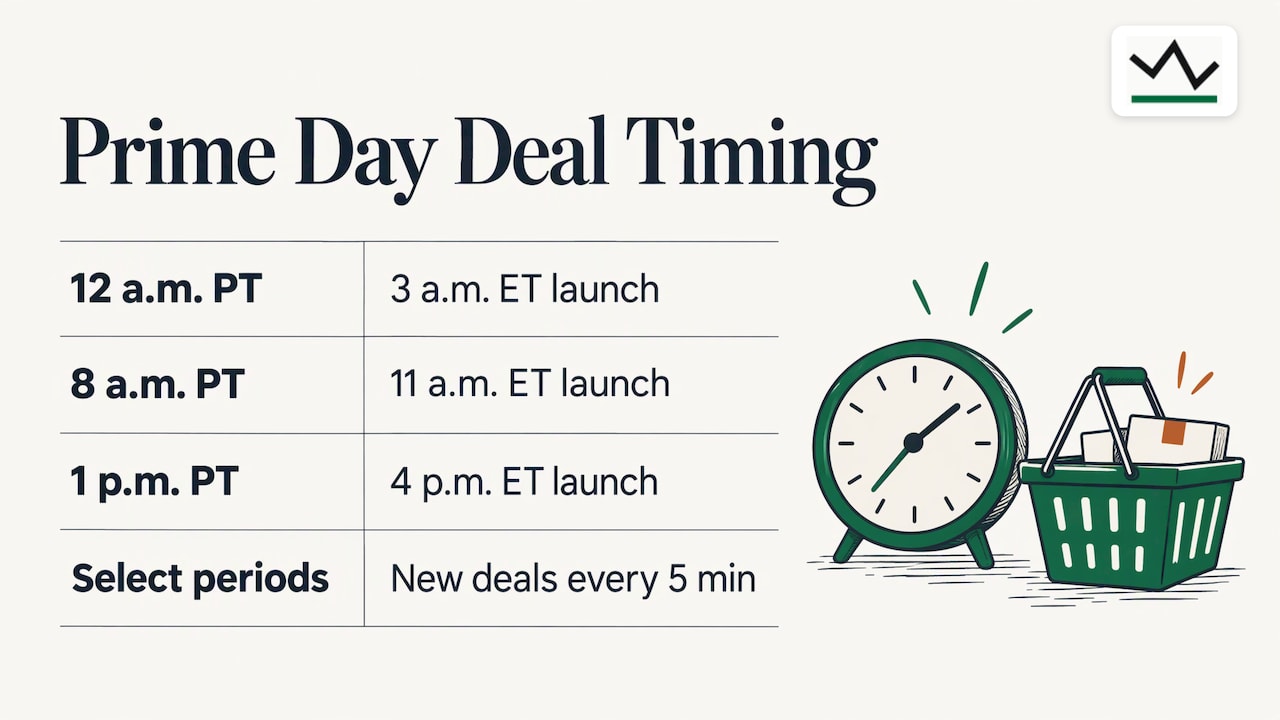
The practical takeaway: during an event, check right after those drop times and keep the Upcoming tab open. Outside events, set alerts and let the deals come to you. Event dates change from year to year, so for the current calendar see our page on every past Prime Day date, which shows how the timing has moved between June and July.
Get alerts instead of refreshing the page
Refreshing Today's Deals all day is a poor use of your time. There are three better layers of alerts.
Amazon's own deal alerts
On an upcoming Lightning Deal, click "Watch this Deal". If you have the latest Amazon app and notifications turned on, you get a push notification when the deal is about to start. Watched deals are collected in a Watched Deals section on the Today's Deals page, and several deals starting together arrive as a single consolidated notification.
Alexa for Shopping
Amazon says Alexa for Shopping can create deal and price alerts for a need you describe, such as noise-canceling headphones, set a target price on a specific item, and even buy automatically when the price hits it. You can also ask for the price history without leaving the product page.
A price tracker for the products you actually want
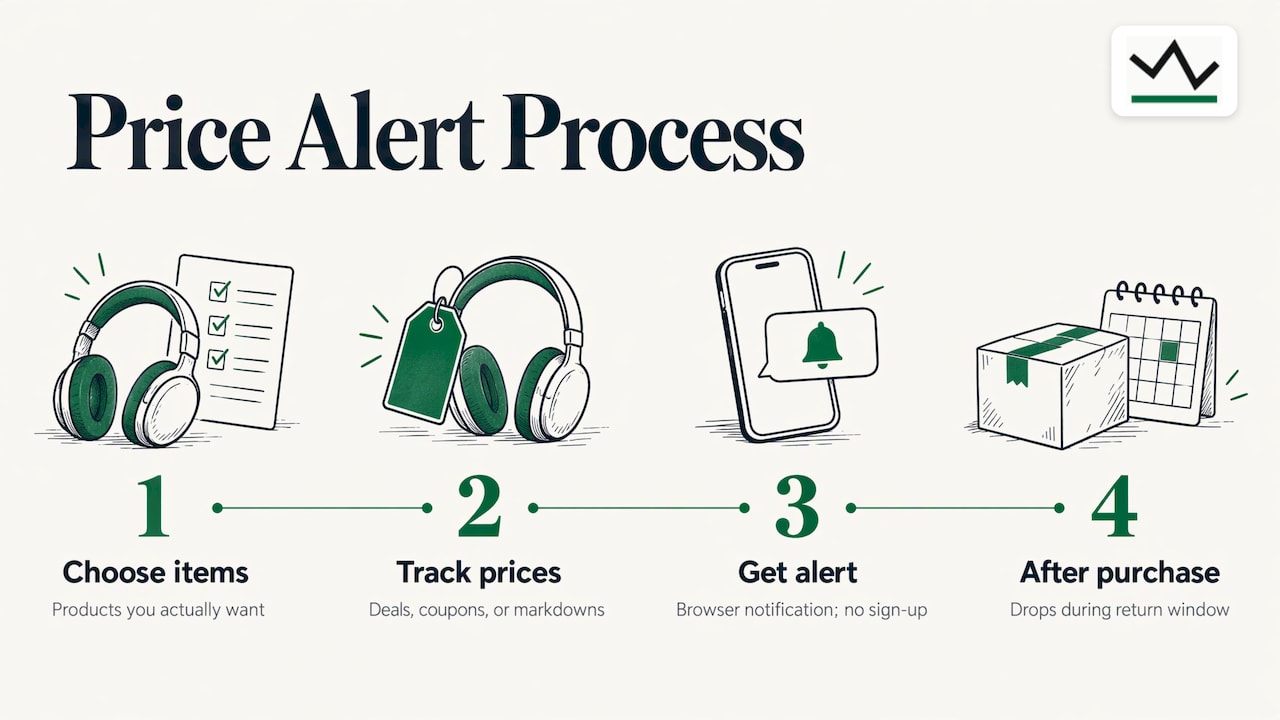
Lightning Deals are random from your point of view: the product that goes on deal may not be the one you need. Reverse the approach. Pick the items you want, track them, and get an alert when the price falls, whether it falls through a Lightning Deal, a coupon or a plain markdown. Our Amazon price tracker works this way, and its browser notifications need no sign-up. We also built alerts for something Amazon's deal page ignores: price drops after you have bought, while you are still inside the return window. For the full method, read our guide to Amazon price alerts backed by a year of price data.
How to claim a deal before it sells out
The mechanics are strict, and knowing them saves deals that would otherwise slip away.
- Decide before the deal starts. Use the Upcoming tab to check the price in advance, so the only decision left is yes.
- Be signed in with payment and address ready. The cart timer leaves no room for typing a card number.
- Add to cart, then check out fast. After you add a Lightning Deal item to your cart, you have 15 minutes to complete the purchase. If you miss it, the discount expires and the deal passes to the next person on the waitlist.
- Use Proceed to Checkout. Under Amazon's Lightning Deal terms, the deal must be redeemed through the Proceed to Checkout button. Using 1-Click can prevent the Lightning Deal from applying.
- Do not cancel and retry. If you cancel a Lightning Deal order, you cannot order that same deal again until 30 minutes have passed, even if it is still active.
The same terms say the promotional discount does not apply to shipping, handling or taxes, and it cannot be transferred or resold. Check the final total at checkout, not just the badge.
Use the waitlist when a deal shows as claimed
If a deal looks gone, select Join Waitlist on the product page. When you are next in line, an alert tells you the deal is available, with a phone notification if app notifications are on. Add it to your cart within the time limit, then complete the purchase within 15 minutes. Places are limited and joining does not guarantee a deal, so keep going about your day and treat it as a bonus.
Know how stock and timers behave
Because stock is capped and timers run in parallel, most quick sales across the web behave alike: a visible stock indicator, a clock, and a cart hold. If you want to see the same pattern outside Amazon, a retailer's in-stock quick sale collection is a handy illustration of how limited inventory is presented. The habit is identical: decide first, then move.
Prime early access
Prime members can get 30 minutes of early access to Lightning Deals, according to Study & Save. That window matters most during members-only events, when popular items can be claimed quickly.
Finding Lightning Deals during major sales events
Events like Prime Day, Prime Big Deal Days and Black Friday multiply the number of deals and the competition for them. A few habits make the difference.
- Build a short list first. Choose five to ten products you already want. Track them in advance so you know their normal price.
- Work from the Upcoming tab each evening and watch the deals you care about.
- Browse by category at drop times. If you shop for the car, electronics, home or outdoors, our category pages show current prices against history: electronics, sports and outdoors and car.
- Look beyond one store. Comparing event offers across retailers, such as in this roundup of toy store discount marketplaces, shows what a good discount looks like in a given category.
If you shop around Independence Day, our page on Fourth of July sales covers how those promotions have played out before.
Is the Lightning Deal actually a good price?
A countdown clock creates pressure, and pressure makes people skip the one check that matters. Here is how to do it in a minute.
Look at the strike-through price
Amazon says it validates savings claims against a verified strike-through price: either a List Price (the suggested retail price) or a Typical Price (what customers have recently paid on Amazon). On search results and product pages you can see when an item is at its 30-day, 90-day or 365-day low, and price history shows up to 365 days of data.
Prefer the recent baseline to the list price
Business Insider's guide to judging deals points out that Amazon's "Was Price", the median over the last 90 days, is a more reliable baseline than the often-inflated List Price. It advises cross-referencing other retailers and being skeptical of percent-off badges, since the List Price can sit far from the typical year-round price.
The same guide notes that price-history tools can show full graphs, though third-party sellers, coupons and Lightning Deals themselves can make a chart look noisy. So read the chart for the pattern, not a single dip.
A quick worked example
Say a pair of headphones shows $60 with a "40% off" badge. The implied list price is $100. Open the price history. If the item has sat at $58 to $65 for most of a year, the deal is a normal price with a loud label. If it usually sits at $80 and has never gone below $65, $60 is a real low. Same badge, opposite verdicts, and only the history tells them apart.
Use this checklist:
- Is the deal price at or near the 90-day or 365-day low?
- Is the "was" price close to what the item actually sold for recently?
- Is the seller Amazon or a third party, and does the price match other retailers?
- Do you want it at this price, or only because the clock is running?
For a deeper method, see our guides on how to see Amazon price history before you buy, checking 90-day and 365-day lows and five price history checks to spot sale noise.
Our perspective
We built BasketPrice around one idea: a discount means nothing until you know what the product cost before it.
Lightning Deals are a perfect example. The timer and the claimed-stock bar make you feel you must decide now, and the strike-through price tells you how big the saving is, as measured by someone else. Our price records come from our own collected price history, not from merchant claims, so you see what the item actually cost over time and judge the deal for yourself.
We also think alerts should fit around your life. You should not need to refresh a deals page at 3 a.m. Our browser notifications need no sign-up, and you can set alerts for price drops and back-in-stock moments on the items you care about. We include a trigger most tools skip: a price drop after purchase, while you are still within the return window.
The best Lightning Deal is the one on a product you already tracked, at a price you already decided was good.
Cleaning
Track the items you want with BasketPrice
If you would rather not hunt through hundreds of live deals, tell us what you want and we watch the price. Add a product to our Amazon price tracker, choose your alert type, and we notify you in your browser when it drops or comes back in stock. We record the prices ourselves, so the history you see is ours, not a retailer's marketing claim.
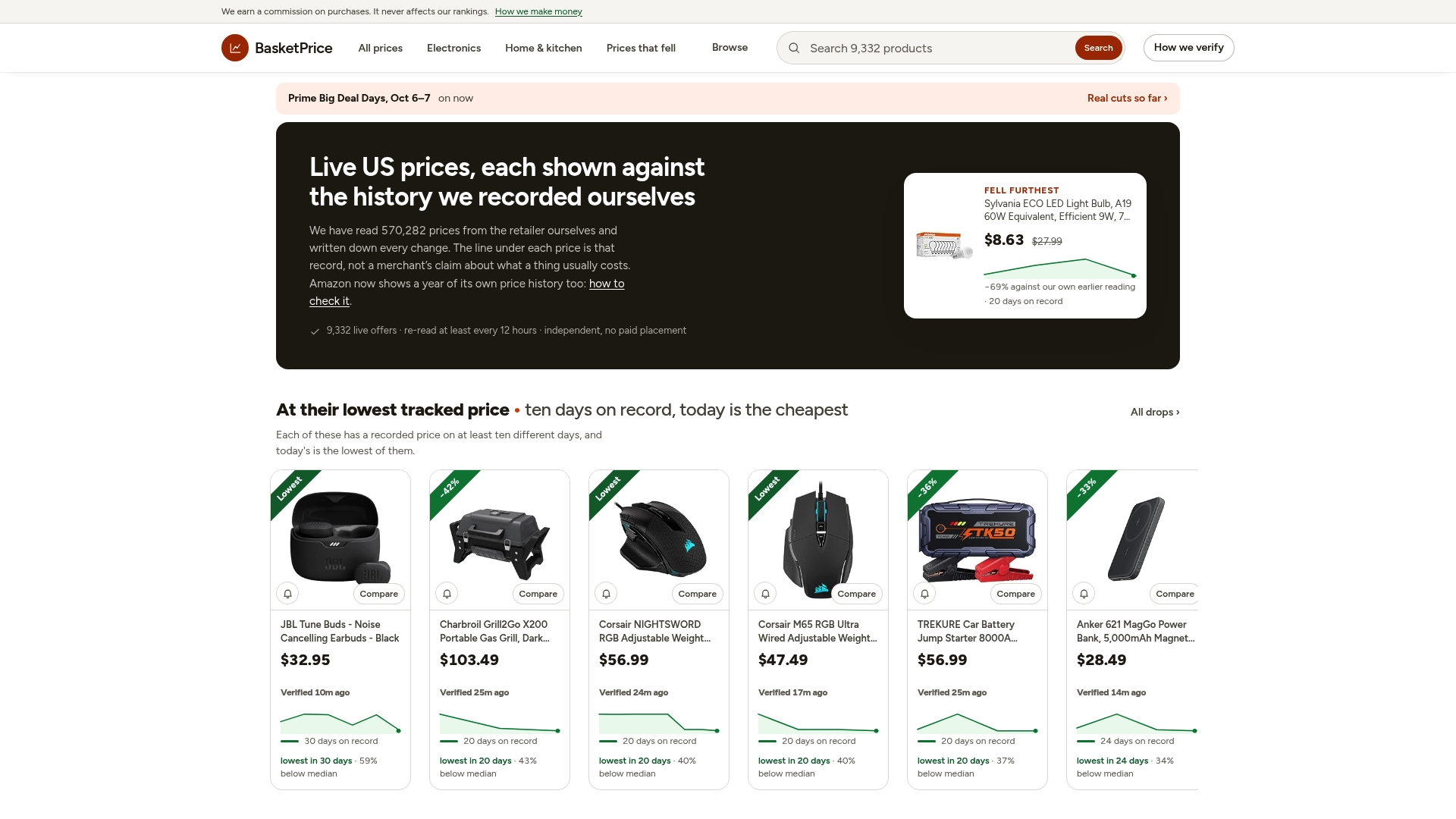
Want to see what current prices look like against their own history first? Browse our Amazon prices checked against their history, or start from BasketPrice and pick a category: car, electronics, home or sports and outdoors.
Mistakes that cost people Lightning Deals
- Adding to cart, then browsing. The 15-minute clock starts at add-to-cart. Finish checkout first.
- Checking out with 1-Click. It can stop the deal from applying.
- Waiting for the schedule. There is no public forward schedule on ordinary days, so build alerts instead.
- Ignoring the progress bar. A high claimed percentage means you should decide in seconds or join the waitlist.
- Trusting the badge. A percent-off label tells you the distance from a reference price, not whether that price was ever real.
- Skipping the final total. The discount does not cover shipping, handling or taxes.
FAQ
Where do I find Lightning Deals on Amazon?
Open the Today's Deals page and choose Lightning Deals from the row of shortcuts. In the app, use the menu, go to Deals & Savings or Today's Deals, and filter by Lightning Deals. The Upcoming tab shows deals that have not started yet.
How long do Lightning Deals last?
Each deal has its own timer, which Business Insider puts at usually 2 to 6 hours. It also ends the moment all the stock is claimed, so it can finish early. Always trust the clock and progress bar on the deal itself.
Can I get an alert when a Lightning Deal starts?
Yes. Click "Watch this Deal" on an upcoming deal with the latest Amazon app installed and notifications on. You can also track products you want with a price tracker and get a notification when their prices fall.
Do I need Prime to buy Lightning Deals?
During Prime Day and Prime Big Deal Days, Lightning Deals are exclusive to Prime members. At other times, check the terms shown on the individual deal page.
Why did my Lightning Deal price not apply?
The most common cause is checking out with 1-Click. Amazon's terms say the deal must be redeemed through Proceed to Checkout. Also check that the 15-minute cart timer had not run out.
Sources
- Amazon Lightning Deals on Prime Day, Amazon Customer Service
- Lightning Deal Terms & Conditions, Amazon Customer Service
- How to find Lightning Deals, Amazon
- How to Find Amazon Lightning Deals on Prime Day, Business Insider
- How to Tell If a Prime Day Deal Is Actually Good, Business Insider
- Are Amazon deals worth it? How to check prices for yourself, Amazon
- Prime Day 2026 deals preview, Amazon
- What time Amazon releases new Prime Big Deal Days deals, USA Today
- Lightning Deals Early Access With Prime, Study & Save
- In Stock Quick Sale, ThePerfumeSampler
- Top 4 Best Toy Store Discounts Marketplaces 2026, ToylandEU