

A product price alert watches an item for you and notifies you when its price falls to a level you chose. The alert only helps if it rests on honest price history. A "was $89.99" tag on a product page is the seller's claim. A price record is what the item really cost over the past weeks and months. At BasketPrice we track Amazon prices ourselves and record them, so your alert compares today's price with what we actually saw, not with what a merchant says the item used to cost.
This guide covers how alerts work, how to set one, how to pick a target price you will not regret, and what to check before you act on a notification.
TL;DR
- A price alert has three parts: a specific product, a target price, and a notification channel. Get all three right and you stop checking prices by hand.
- Judge a price against recorded history (typical price, recent low, seasonal low), not against the crossed-out list price.
- Use two numbers: a ceiling you would accept if you had to buy soon, and a lower target that is an easy yes.
- Before you buy after an alert, confirm the price, the exact model, the delivered cost and any conditions in the fine print.
- Turn off alerts for things you bought or no longer want, so the ones that remain are worth reading.
Table of Contents
- What a product price alert is and how it works
- Why history matters more than the discount badge
- How to set up a product price alert
- What to check when an alert arrives
- Why an alert may be late or never arrive
- Which items are worth alerting on
- Track prices around big sales
- Start tracking on BasketPrice
- Our perspective
- FAQ
- Sources
What a product price alert is and how it works
An alert is a rule attached to a product page. A tracker reads the item's price on a schedule, stores each reading, and compares the newest reading with your rule. When the price crosses your line, you get a message. That is the whole mechanism, and it is why prices that change often, like electronics and many household goods, suit alerts so well.
The need is real because online prices move constantly. Google's own help page says prices are dynamic and subject to change, and that its tracking feature notifies you when a price you want is reached. Alerts exist across the web in various forms: a saved search, a browser extension, an app, a page you ask to be monitored.
The form matters less than three questions:
- Where does the price data come from? Recorded readings are more reliable than a retailer's "regular price" label.
- How long is the history? A week of data tells you little. A year shows seasonal patterns.
- How much friction before the alert works? Some tools need an account before they do anything. Ours uses browser notifications with no sign-up required.
Why history matters more than the discount badge
A price alert tells you the price fell. It does not tell you the price is good. Those are different claims, and the gap between them is where shoppers lose money.
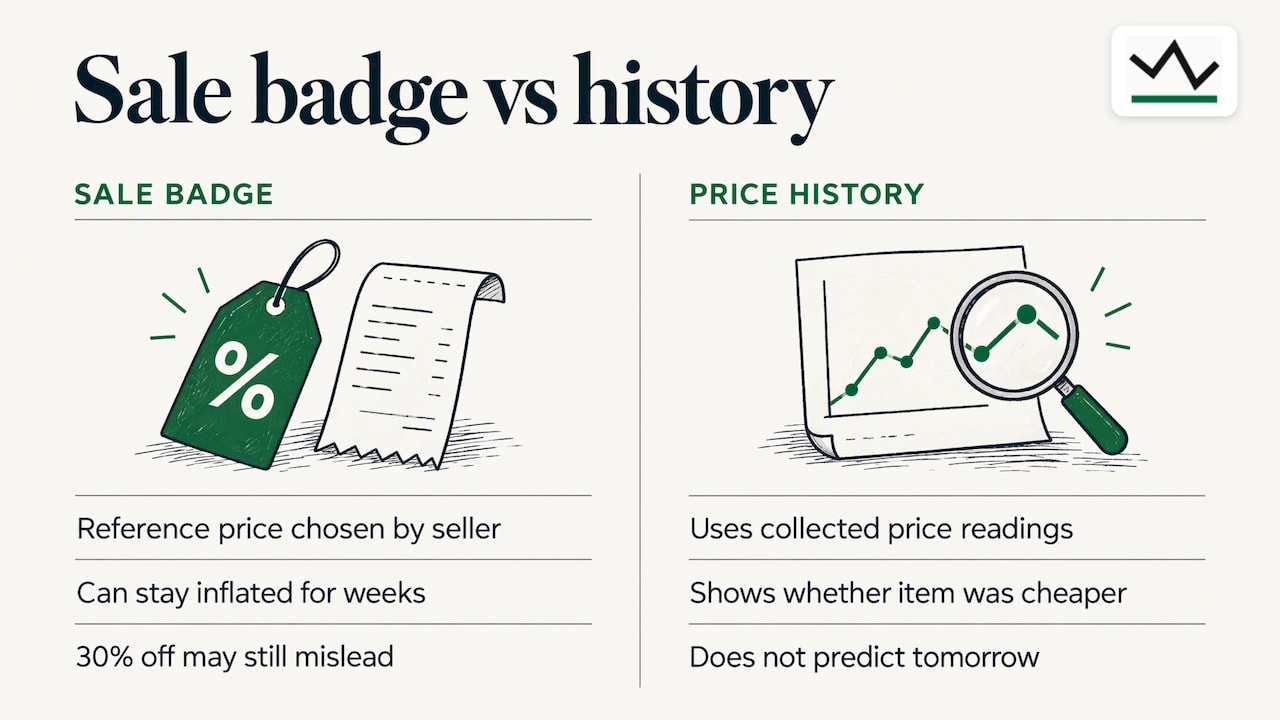
Consumer advocate Edgar Dworsky, quoted by the Associated Press, recommends using a price-history tracker to see how a price has changed over time and whether the item has been cheaper, instead of trusting a crossed-off list price. The point holds for any product: the reference price printed next to a sale is chosen by the seller.
One shopping guide describes how a list price can stay inflated long after the street price has settled lower, so a store can advertise "30% off" on an item that had been selling below that reference for weeks. The better comparison is the current price against the lowest typical selling price.
That is why we publish price records built only from our own collected readings. When you open a product on BasketPrice you see what the item cost when we looked, not a number a merchant supplied. If you want a deeper walkthrough, our guide on how to see Amazon price history before you buy shows what to look for on the chart.
The four numbers worth reading
A guide on spotting fake sales names four data points that make a price history useful, and they translate directly into how you read a chart:
| Data point | What it answers |
|---|---|
| Current price | What am I being asked to pay right now? |
| Typical recent price | What do most shoppers actually pay? |
| Recent low | How low has it gone lately? |
| Seasonal low | How low does it go during big sale periods? |
The source of this framework is ShoppingAllAbout's explainer on real versus fake sales. The same page is candid about what history can't do: it describes the past and does not predict tomorrow. Its value is removing one uncertainty, whether the sale price is meaningfully below what shoppers have recently been asked to pay.
If you want to read these numbers quickly, our page on how to check price history for 90-day and 365-day lows explains the two windows we use most. For a broader look at why sale claims can mislead, understanding inflation and prices gives useful background on how prices rise and are perceived over time.
How to set up a product price alert
The steps below work with any tracker. At each one we say where it usually goes wrong and what BasketPrice does at that step.
Step 1: Pin down the exact product
Track one specific listing, not a category. A laptop with 8 GB of memory and the same laptop with 16 GB are different products with different price histories. Colors, bundle contents and seller can change the price too.
Where it goes wrong: you set an alert on a model name, then the notification arrives for a variant you did not want. A weekly review routine suggested by one deal guide includes checking that each tracked product still matches the exact specification. Do that check at setup, and you rarely need it later.
What we do: we track products across major online retailers, primarily Amazon, so you start from the product page and its recorded history rather than a search term.
Step 2: Look at the history before you pick a number
Open the chart. Note the typical price, the recent low and, if the product has been around a year, the seasonal low. Your target should come from these, not from the badge on the page.
Where it goes wrong: people set a target from the list price ("I'll buy at 40% off") and then wait for a discount that the item hits every other week, or never reaches.
What we do: our records are built from our own readings, with up to a year of data for Amazon products. Our article on Amazon price alerts and verifying drops against a year of price data goes through this step in detail.
Step 3: Choose a ceiling and a target
One number is rarely enough. A guide on setting useful alerts recommends two: a ceiling price and a target price. The ceiling is the highest all-in total you would pay if you needed to buy soon. The target is the price at which the item becomes an easy yes if nothing unusual has changed.
A worked example: say a pair of wireless earbuds usually sits at $79, has dipped to $64 in the last three months, and hit $55 during a past holiday sale. You might set a ceiling of $65 (you need them soon, and that equals the recent low) and a target of $56 (near the seasonal low). If the price touches $65 you can buy and be fine. If you can wait, you hold out for $56. Without the history you could not have chosen either number sensibly.
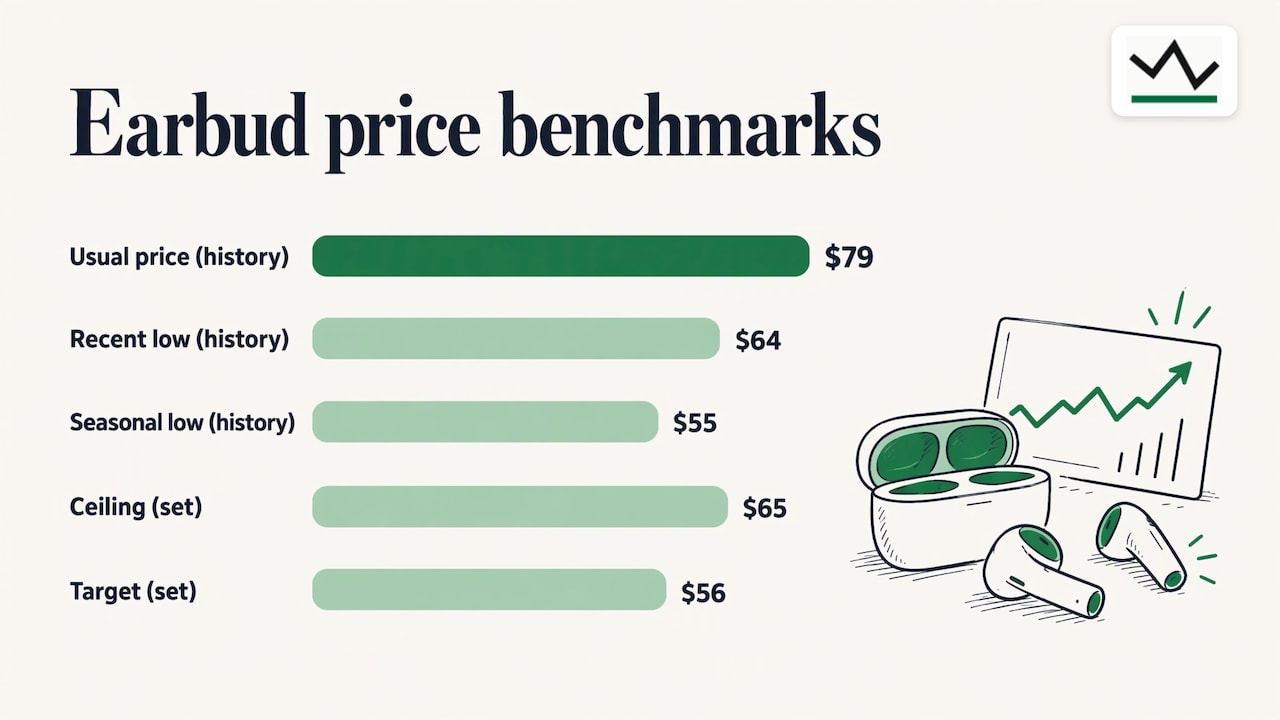
This example uses illustrative figures, not a real product's prices. Use your own chart.
Where it goes wrong: the target is so low the alert never fires, or the ceiling is so high every small dip triggers a message you ignore.
Step 4: Pick the notification channel
Choose the channel you will actually see. Email works for items you can wait on. Browser notifications work for items where a short window matters.
What we do: BasketPrice offers browser notifications for price alerts with no sign-up required. You can set the alert and be notified without creating an account first. If you prefer email too, see our guide to setting up email and browser price alerts.
By comparison, some general-purpose tools need you to sign in to an account first. Google's tracking feature, for example, requires a signed-in Google Account and then sends push notifications and emails when the price drops below an optional target.
Step 5: Add the alerts that save you the most
A basic alert fires when the price falls. Two more triggers cover cases people forget:
- Back-in-stock alerts. A product that sold out is often worth watching. We send custom back-in-stock notifications along with price-drop alerts.
- Post-purchase price drops within return windows. If you already bought an item and the price falls while you can still return it, that is money worth knowing about. This is one of the triggers that sets our alerts apart.
Step 6: Keep the list short
Notification control matters as much as price control. One deal guide advises using instant alerts for a narrow list of high-priority items, a daily or weekly digest for general promotions, and turning off alerts for products you bought or no longer need. An alert you cannot act on is clutter, and clutter trains you to ignore the one message that matters.
What to check when an alert arrives
An alert is a prompt to look, not an order to buy. Run through these checks in about a minute.
- Is the price still live? Prices change quickly. Open the product page and confirm the figure on screen.
- Is it the same item? Compare model number, size, color and condition with the listing you meant to track.
- What is the delivered cost? Add shipping, tax where it applies and any membership requirement. Your ceiling should be an all-in figure.
- Is it a real drop? Compare with the history: typical price, recent low, seasonal low.
- Are there strings attached? A deal-notification guide advises reading the fine print for terms like eligible users, date limits and minimum spend, and checking whether the change is repeatable before acting.
The same guide suggests cross-checking a price in at least three places, such as different devices, browsers and sources. With BasketPrice the history check is already done: the price record sits on the product page next to the live offer, so steps 1 and 4 take seconds. Our article on how to track Amazon prices and verify the "was" price walks through that check.
A five-minute weekly review
If you track more than a handful of items, a short routine keeps alerts useful. The same onsale guide suggests a weekly review: delete alerts for items you no longer need, confirm each product still matches your specification, update your delivered-cost estimate and target price, verify any coupon or shipping assumption, and move the worthwhile alerts to instant notifications while leaving broad promotions in a digest.
Why an alert may be late or never arrive
If an alert seems slow or missing, the cause is usually one of a few ordinary things:
- The price moved and moved back. Some prices rise and fall within hours. A reading schedule can miss a brief dip, and a deal may have ended by the time you click.
- The notification channel is blocked. Browser notifications can be silenced by your browser or operating system settings, and emails can land in a spam folder. Check both first.
- Your target is below anything the item has reached. The alert is working, the price just has not arrived. Compare your target with the recent low on the chart.
- The listing changed. Sellers swap variants, merge listings or retire pages, so an alert tied to the old page goes quiet. Re-create the alert from the current product page.
- The price depends on you. Coupons, membership prices, location and seller can change what you see compared with what the tracker recorded. Confirm the final figure at checkout.
If you track on BasketPrice, you can always open the product's page to see the latest recorded price and history, then adjust the target from there.
Which items are worth alerting on
Alerts pay off most on items that you plan to buy, that cost enough to matter, and whose prices move often. Think of these groups:
- Electronics and PC parts. Prices swing with launches and sales. Our electronics deals and PC components pages show current prices next to their history.
- Smart home devices. Frequent promotions make a target price worthwhile. See smart home prices.
- Car care and car electronics. Everyday purchases where a recorded low saves money repeatedly. Browse car care and car electronics.
- Fitness and camping gear. Seasonal pricing is strong here, so the seasonal low matters. See fitness and camping and hiking.
For grocery-style or multipack items, price per unit is the number to alert on. Our guide to comparing unit prices online with price history shows how.
Track prices around big sales
Major sale events are where discount claims multiply and where history helps most. Add the items you want before the sale starts so your alert has a baseline, then compare the sale price with the recent and seasonal lows instead of the banner. Our Black Friday item tracker collects tracked deals in one place. For Target listings, our guide on how to see Target price history applies the same method.
Start tracking on BasketPrice
BasketPrice monitors price changes across major online retailers, primarily Amazon, and keeps a record from our own readings. You can follow a specific item, receive custom price-drop and back-in-stock notifications in your browser without signing up, and see the price against its history before you decide.
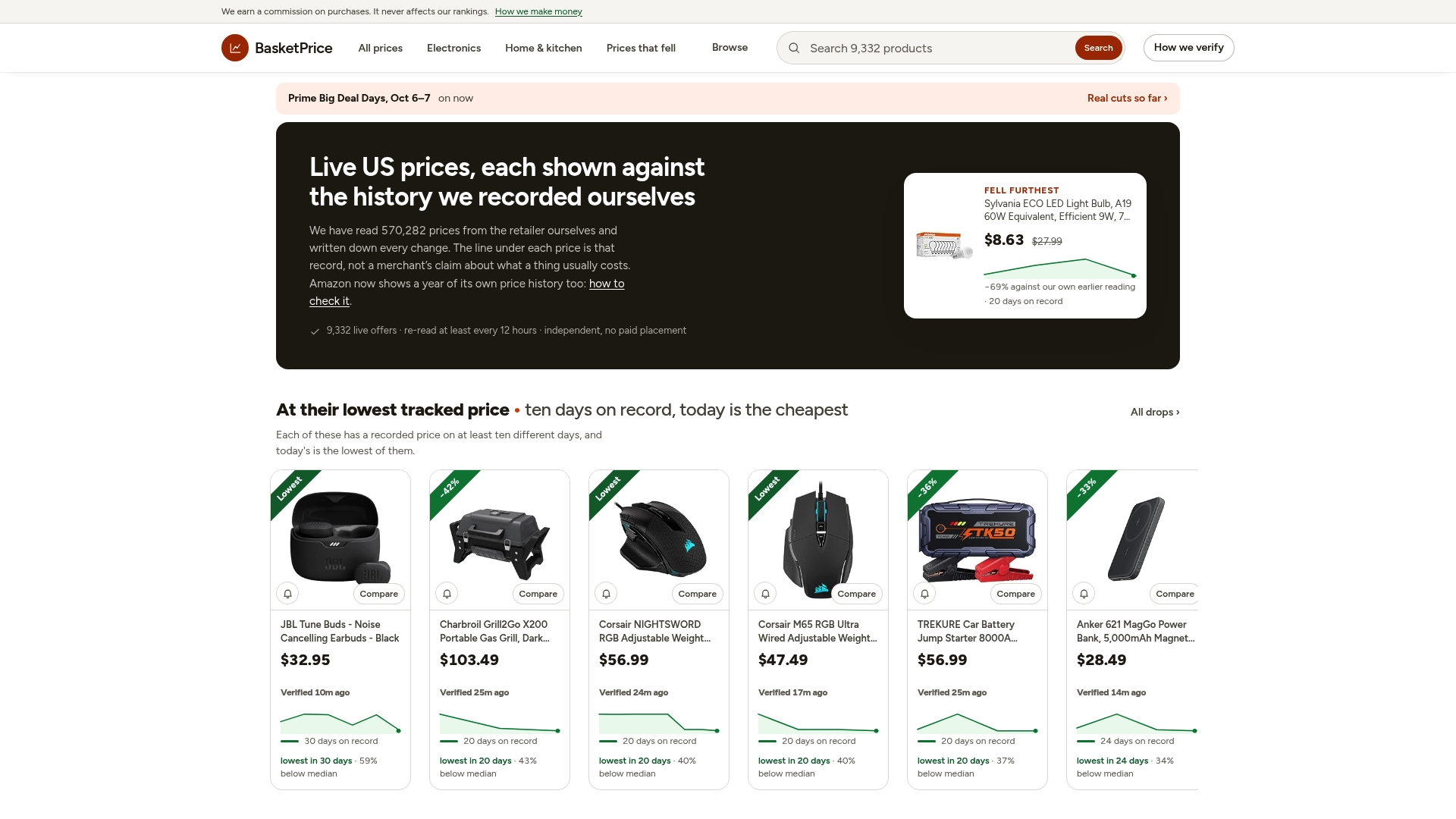
Start on the page that fits what you plan to buy: electronics, car, home and sports and outdoors deals, or browse thousands of Amazon prices against their own history.
Our perspective
Most price alerts are built around one question: did the price go down? We think the better question is: down from what? A drop from an invented list price is not a drop.
That is why BasketPrice publishes price records based on our own collected price history, not merchant claims. When you set an alert with us, the comparison point is something we recorded, so you can read the chart, pick a ceiling and a target, and know what a good price looks like for that item.
We also built alerts around how people really shop. Browser notifications work without sign-up, so an alert takes seconds to create. Back-in-stock alerts catch items that vanish. And post-purchase price drop alerts tell you when an item you already bought falls in price within its return window, because the decision does not always end at checkout.
Our advice is simple: track fewer items, set two numbers for each, and let the history decide whether an alert is worth acting on.
Cleaning
FAQ
Are product price alerts free?
On BasketPrice you can set price alerts and receive browser notifications without signing up. Pricing for other tools varies, so check the tool you choose before you rely on it. Whatever tool you use, the alert itself is only as good as the price history behind it.
How do I choose a target price?
Open the price history and note the typical price, the recent low and the seasonal low. Set a ceiling you would accept if you had to buy soon and a lower target that would be an easy yes. Our guide to checking 90-day and 365-day lows shows how to read those numbers.
Can a price alert guarantee the lowest price?
No. History describes what has happened and does not predict what comes next. What it gives you is a clear picture of whether today's price is meaningfully lower than what shoppers have recently paid, which is the most useful thing to know before you buy.
What should I do if I bought something and the price dropped?
Check whether you are still inside the retailer's return window. If you are, a price drop may be worth acting on. BasketPrice includes alerts for post-purchase price drops within return windows, so you hear about it without checking every day.
Why did I get an alert for a price that is no longer available?
Prices can change within hours, and a brief dip can end before you open the page. Confirm the live price on the product page, then check the history to see whether it is likely to return to that level.
Sources
- About price tracking on Google, Google Shopping Help
- Sale ending soon? How online stores trick you into buying, AP News
- Real Tech Discounts vs Fake MSRP Markdowns, Fuzzy.cheap
- How to Tell If an Online 'Sale' Is Actually a Real Deal, ShoppingAllAbout
- Price Tracker Guide: Set Alerts That Actually Help, Pricecompare.link
- Best Deal Alerts and Price Trackers Guide, onsale.website
- How to Spot Fake Deal Notifications, Bargain.link